Box Size Calculator
Enter your item or items and the clearance to get the inside and outside dimensions of the box you need.
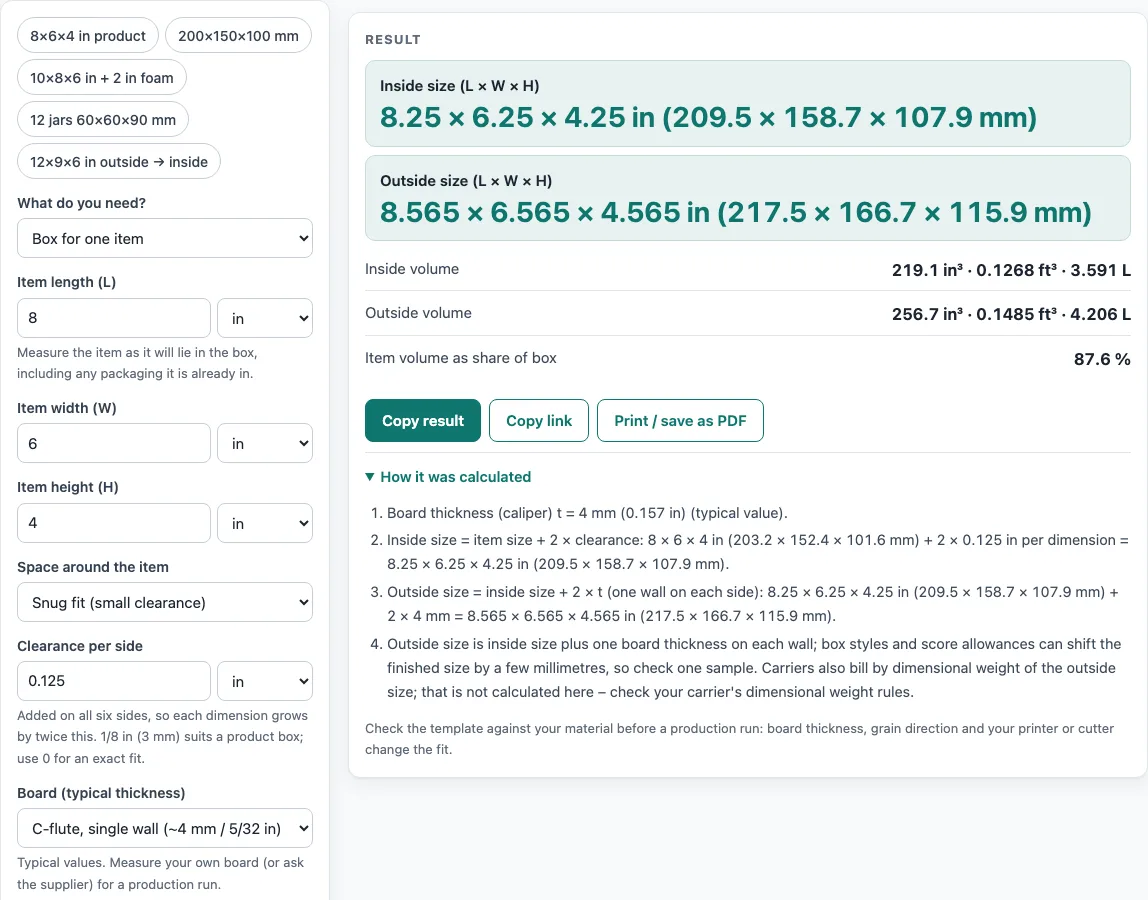
How to use the Box size calculator
- Open “What do you need?” and choose “Box for one item”, “Box for several identical items” or “Convert inside ↔ outside size”.
- For one item, enter “Item length (L)”, “Item width (W)” and “Item height (H)”, choosing inches, mm or cm for each. Measure the item as it will lie in the box.
- Under “Space around the item”, choose “Snug fit (small clearance)” or “Cushioned (foam, paper or air pillows)”, then enter “Clearance per side” or “Cushion thickness per side”. The default clearance is 1/8 in (3 mm).
- Under “Board (typical thickness)”, pick a flute type, or “Custom thickness” and enter “Board thickness”.
- For several items, set “Arrangement”: “Find the most cube-like grid for N items” with “Number of items (N)”, or “I know the counts per row, column and layer” with the three counts.
- To check an existing box, choose the convert mode, set “Convert” to “Inside size → outside size” or the reverse, and enter “Box length (L)”, “Box width (W)” and “Box height (H)”.
- Read the results and any warnings.
In the grid mode, “More options” holds “Gap between items” and a checkbox that allows up to 25 % empty slots. The example buttons load sample sets, such as “12 jars 60×60×90 mm”. “How it was calculated” lists every step. “Copy result” and “Copy link” share the numbers, “Print / save as PDF” prints them, and “Reset” restores the defaults.
How do you measure a box?
Measure the inside length, width and depth of the opening to find the space the contents need. Measure the outside to find the footprint the box takes up. Box dimensions are usually written length × width × depth, with length as the longer side of the opening.
Inside and outside sizes differ by the board thickness on each wall. The tool uses these typical values: about 1.5 mm for E flute, 3 mm for B flute, 4 mm for C flute and 6.5 mm for BC double wall. They are typical, not exact, so measure your own board or ask the supplier before a production run.
How do you calculate box size for a product?
Start with the product’s length, width and height, measured as it will lie in the box. Add clearance or cushioning to each side to get the inside size, then add two board thicknesses to get the outside size.
- Inside dimensions = item dimensions + 2 × clearance (or cushioning).
- Outside dimensions = inside dimensions + 2 × board thickness.
Each dimension grows by twice the clearance, because the allowance is added to both sides. For the default 8 × 6 × 4 in item with 1/8 in clearance and C-flute board (4 mm), the inside size is 8.25 × 6.25 × 4.25 in (209.5 × 158.7 × 107.9 mm). The outside size is 8.565 × 6.565 × 4.565 in (217.5 × 166.7 × 115.9 mm). The inside volume is 219.1 in³ (3.591 L), and the item fills 87.6 % of it.
How do you size a box for several items?
Pick the grid mode and enter the item size and the number of items. For 12 jars of 60 × 60 × 90 mm with 3 mm clearance and B-flute board (3 mm), the tool finds a 3 × 2 × 2 grid. The inside size is 186 × 126 × 186 mm and the outside size is 192 × 132 × 192 mm, with the jars filling 89.2 % of the inside volume.
How do you convert inside size to outside size?
Add two board thicknesses to each inside dimension, or subtract them from each outside dimension. A box of 12 × 9 × 6 in outside, made of C-flute board, has an inside size of 11.69 × 8.685 × 5.685 in.
Box styles and score allowances can shift the finished size by a few millimeters, so make one sample. Carriers may bill by dimensional weight, which depends on the outside size. The calculator does not work that out, so check your carrier’s rules.
Sources
- Packlane, How thick is the material of my boxes and Sourceful, corrugated flutes — E-flute about 1/16 in (1.5 mm), B-flute about 1/8 in (3 mm)
- C-flute about 5/32 in (4 mm) and BC double wall about 6.1–6.7 mm, typical caliper figures; mills differ, so measure your board
- 1 in = 25.4 mm exactly (NIST SP 811)
Worked examples
| Input | Result |
|---|---|
| Item 8 in × 6 in × 4 in | inside 8.25 × 6.25 × 4.25 in (209.5 × 158.7 × 107.9 mm); outside 8.565 × 6.565 × 4.565 in (217.5 × 166.7 × 115.9 mm) |
| Item 200 mm × 150 mm × 100 mm | inside 206 × 156 × 106 mm (8.11 × 6.142 × 4.173 in); outside 209 × 159 × 109 mm (8.228 × 6.26 × 4.291 in) |
| Item 10 in × 8 in × 6 in | inside 14 × 12 × 10 in (355.6 × 304.8 × 254 mm); outside 14.51 × 12.51 × 10.51 in (368.6 × 317.8 × 267 mm) |
| Item 60 mm × 60 mm × 90 mm, packed as 3 × 2 × 2 = 12 slots | inside 186 × 126 × 186 mm (7.323 × 4.961 × 7.323 in); outside 192 × 132 × 192 mm (7.559 × 5.197 × 7.559 in) |
| Outside 12 in × 9 in × 6 in | 11.69 × 8.685 × 5.685 in (296.8 × 220.6 × 144.4 mm) |
Calculated by the tool above with these values.
Frequently asked questions
Is the calculator free, and is anything I type uploaded?
Yes, it is free and needs no sign-up. It runs entirely in your browser, and nothing you type is uploaded.
Can I use the results in commercial work?
Yes. Results may be used in commercial work, including quotes, and no attribution is needed. Check any terms your client sets.
Do I still need to make a sample?
Yes. The result is a starting point, because board thickness, grain direction and the box style all change the fit. Make a sample before a production run.
Does the tool design the box or give a cutting template?
No. It gives sizes, volumes and the fill percentage only. For fold lines and cut lines, use the box template generator linked below.
Why does the tool warn about cushioning or clearance?
Cushioning under 1/2 in (12.7 mm) gives little protection for fragile items. A clearance of 0 is an exact fit, and items rarely go in without some room, so allow at least 1/16 in (1.5 mm). A clearance over 1 in (25.4 mm) per side leaves a lot of loose space, so use a cushion setting if the space is to be filled.
Can it size a bag instead of a box?
No, it only sizes boxes. For flat bags, use the poly mailer sizes chart linked below.
Related tools
- Mailer box sizes chart: Compare common mailer box sizes when you need an off-the-shelf option.
- Poly mailer sizes chart: Look up common poly mailer dimensions when your item ships in a bag instead of a box.
- Envelope size chart: Check envelope sizes for flat items that need no box.
- Label size chart: Find common label dimensions to match the box you are packing.
- Box template generator: Create a box template when you want to design the folds and cut lines yourself.
- Pizza box dieline: Use this dieline when your box is a pizza box or similar food container.
- Tuck box template: Use this template for a tuck-top carton with a folding lid.
- Cardboard box weight calculator: use it to weigh the empty box before shipping.
- Box strength calculator: use it to check how much load a box can take in a stack.
- All calculators: Browse every calculator on the site.