Box Template Generator (Dieline Maker)
Pick a box style, type the inside size and board thickness, and download the dieline as SVG or DXF, or print it.
The Box Template Generator is a free tool that turns the inside size of a box into a printable flat template, also called a dieline or blank. It makes templates for a regular slotted container, an open tray with corner flaps, or a roll-end tuck-front mailer. It runs entirely in your browser, needs no sign-up, and does not upload anything you type.
You enter the inside length, width and height, choose a material, and the tool draws the cut lines and folds. It reports the blank size in millimeters and inches and checks whether the blank fits standard paper sizes. You can then download the template as an SVG or DXF file for printing, cutting machines or design software.
Use it when you need a cardboard box template to test a shipping carton, tray or mailer before you order samples.
How to use the Box Template Generator
- Choose a Box style: Regular slotted container (RSC, FEFCO 0201 style), Open tray with corner flaps, or Roll-end tuck-front mailer (FEFCO 0427 style).
- Enter Inside length (L), Inside width (W) and Inside height (H). Use the unit menu beside each value to pick inches, millimeters or centimeters. Inside means the space the product sees.
- Open More options and choose a Material, such as B-flute corrugated (3 mm). For a custom board, choose Custom thickness and enter the value in Material thickness (T).
- If needed, set Glue-flap width (the manufacturer’s joint on the slotted container) and Tuck-flap depth (the flap that tucks into the front wall).
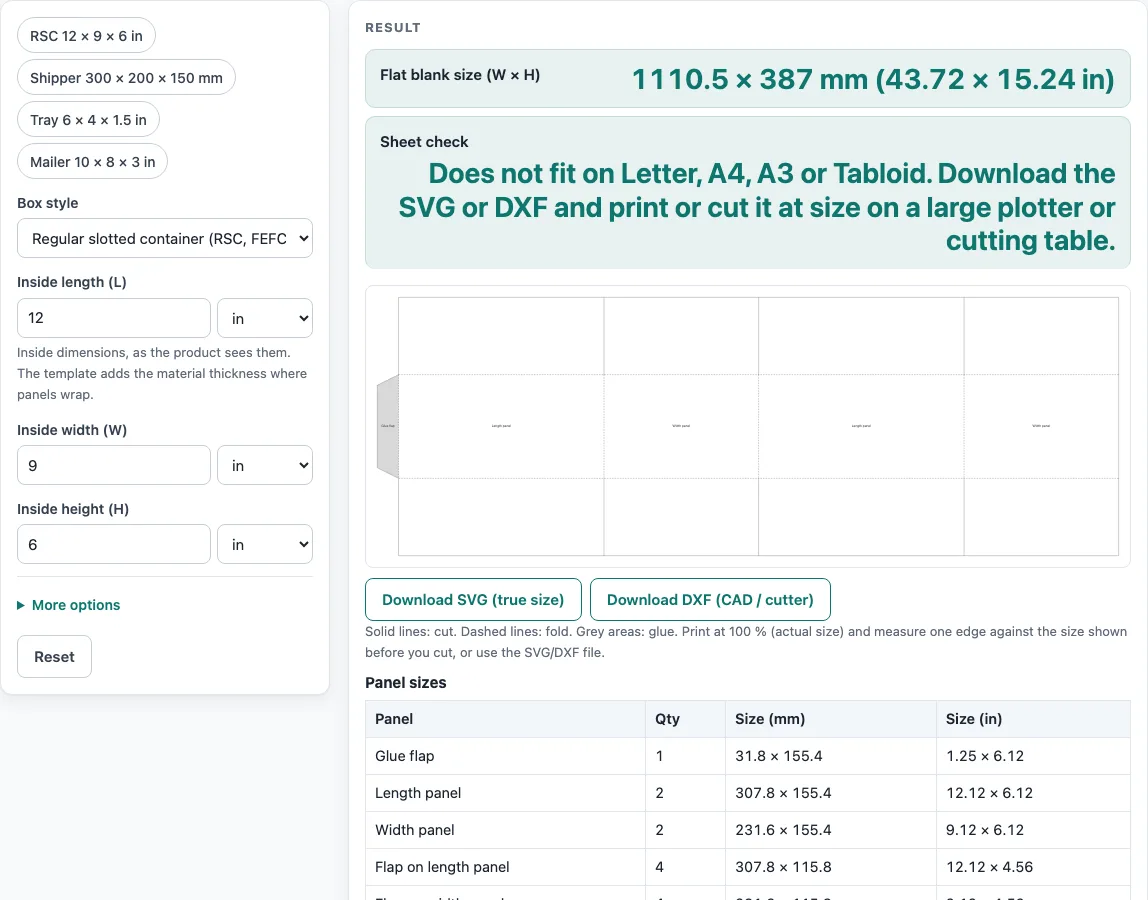
- Read the result. Flat blank size (W × H) gives the blank dimensions, and Sheet check shows whether it fits Letter, A4, A3 or Tabloid.
- Open How it was calculated to see each step with your own numbers.
- Download SVG (true size) or DXF (CAD / cutter), or choose Print / save as PDF.
The example buttons above the form fill in sample sizes: RSC 12 × 9 × 6 in, Shipper 300 × 200 × 150 mm, Tray 6 × 4 × 1.5 in and Mailer 10 × 8 × 3 in. Copy link saves every input in the page address, so the same template reopens later. Reset restores the default values. When printing, set the scale to 100 %, not “fit to page,” so the template stays at actual size.
How do you make a box template?
Start from the inside size, add the board thickness to every panel that wraps around the box (the open tray’s base is the exception and stays at the inside size), and lay the panels out in a row with the flaps attached. The flat blank is the total length of the panels plus the glue flap, and its height is the box height plus the two top and bottom flaps.
For a regular slotted container, the tool works through these steps. Take a 12 × 9 × 6 in inside box (304.8 × 228.6 × 152.4 mm) with 3 mm board. Each wrapping panel gets one thickness T added, giving a length panel of 307.8 mm, a width panel of 231.6 mm and a wall height of 155.4 mm. The top and bottom flaps are half the width panel, 115.8 mm, so they meet in the middle. The blank width is the glue flap plus two length panels plus two width panels, 1110.5 mm, and the blank height is the wall height plus two flaps, 387 mm.
What is a box dieline?
A box dieline is the flat drawing of a box that shows where to cut and where to fold. Printers, die makers and cutting machines use it to make the box, and the terms dieline and template are often used for the same drawing.
On a template from this tool, solid lines are cut lines, dashed lines are folds, and grey areas take glue. Box sizes are usually given as inside dimensions. The finished box is about twice the board thickness larger on the outside, so the template adds one thickness T to each wrapping panel as a folding allowance.
Sources
- Packlane, How thick is the material of my boxes and Sourceful, corrugated flutes — E-flute about 1/16 in (1.5 mm), B-flute about 1/8 in (3 mm)
- Panel sizes, flaps and curves are plain geometry (no packaging standard is copied); FEFCO style codes are used only as names
- Paper sizes: A4 210 × 297 mm and A3 297 × 420 mm (ISO 216), US Letter 8.5 × 11 in and Tabloid 11 × 17 in (ANSI/ASME Y14.1)
- 1 in = 25.4 mm exactly (NIST SP 811)
Worked examples
| Input | Result |
|---|---|
| Regular slotted container (RSC, FEFCO 0201 style), 12 × 9 × 6 in, B-flute corrugated (3 mm) | Blank 1110.5 × 387 mm (43.72 × 15.24 in). Does not fit on Letter, A4, A3 or Tabloid. Download the SVG or DXF and print or cut it at size on a large plotter or cutting table. |
| Regular slotted container (RSC, FEFCO 0201 style), 300 × 200 × 150 mm, E-flute corrugated (1.5 mm) | Blank 1036 × 353 mm (40.79 × 13.9 in). Does not fit on Letter, A4, A3 or Tabloid. Download the SVG or DXF and print or cut it at size on a large plotter or cutting table. |
| Open tray with corner flaps, 6 × 4 × 1.5 in, Cardstock (0.3 mm) | Blank 229.2 × 178.4 mm (9.02 × 7.02 in). Fits on one Letter sheet and on one A4 sheet (with a ¼ in / 6.35 mm printer margin). |
| Roll-end tuck-front mailer (FEFCO 0427 style), 10 × 8 × 3 in, E-flute corrugated (1.5 mm) | Blank 567.8 × 596.5 mm (22.35 × 23.49 in). Does not fit on Letter, A4, A3 or Tabloid. Download the SVG or DXF and print or cut it at size on a large plotter or cutting table. |
| Regular slotted container (RSC, FEFCO 0201 style), 120 × 80 × 60 mm, Chipboard (thick) (1 mm) | Blank 419 × 142 mm (16.5 × 5.59 in). Too big for Letter or A4, but fits A3 / Tabloid. Download the SVG to print it at size. |
Calculated by the tool above with these values.
Frequently asked questions
Is the calculator free, and is anything I type uploaded?
Yes, the tool is free and needs no sign-up. It runs entirely in your browser, and nothing you type is uploaded.
Can I use the results in commercial work such as quotes and bids?
Yes. Templates and results may be used in commercial work, including boxes and bags that are sold and files sent to printers and die makers. No attribution is needed.
Why does my blank not fit on a Letter or A4 sheet?
Many box blanks are wider than a standard sheet. The 12 × 9 × 6 in regular slotted container needs a blank of 1110.5 × 387 mm, so it does not fit Letter, A4, A3 or Tabloid. Download the SVG or DXF and print or cut it at full size on a large plotter or cutting table.
Which settings depend on the box style?
Box style offers a regular slotted container, an open tray with corner flaps and a roll-end tuck-front mailer. Under More options, Glue-flap width appears only for the slotted container and Tuck-flap depth only for the mailer. The defaults are 1.25 in and 1 in.
Do I need to make a test box before ordering production runs?
Yes. A template is a starting point, and board thickness, grain direction, your printer and your cutter all change the fit. Make a sample before a production run.
Related tools
- Pizza box dieline: Use it when you need a flat layout for a pizza box.
- Tuck box template: Use it for a folding carton that closes with a tuck flap.
- Rectangle box template: Use it for a plain rectangular box with a set length, width and height.
- Gift box template: Use it when you want a box for presents or retail packaging.
- Gable box template: Use it for a box with a peaked, gable-style top.
- Pillow box template: Use it for a small pillow-shaped box for candy or favors.
- Paper bag template: Use it when you need a flat pattern for a paper bag instead of a box.
- Box strength calculator: use it to estimate the compression strength of the carton from its ECT rating.
- All calculators: Use it to browse every calculator on the site.