Cube Template (Printable Cube Net)
Set the edge length, choose tabs and face numbers, and print a cube net that folds into a 3D cube.
How to use the Cube Template
- Set Edge length to the length of one edge of the finished cube, and choose in, mm or cm from its unit menu.
- Open Face marks and pick Numbers 1–6 (like a die), Letters A–F, or None (blank faces).
- Tick Add glue tabs if you want tabs for gluing. To change the tab size, open More options and set Tab width in in, mm or cm.
- Read the result rows: Flat size with tabs (W × H), Sheet check, Surface area (6 × edge²) and Volume (edge³). Read any warning that appears before you cut. With tabs switched off, the first row shows the plain cross size.
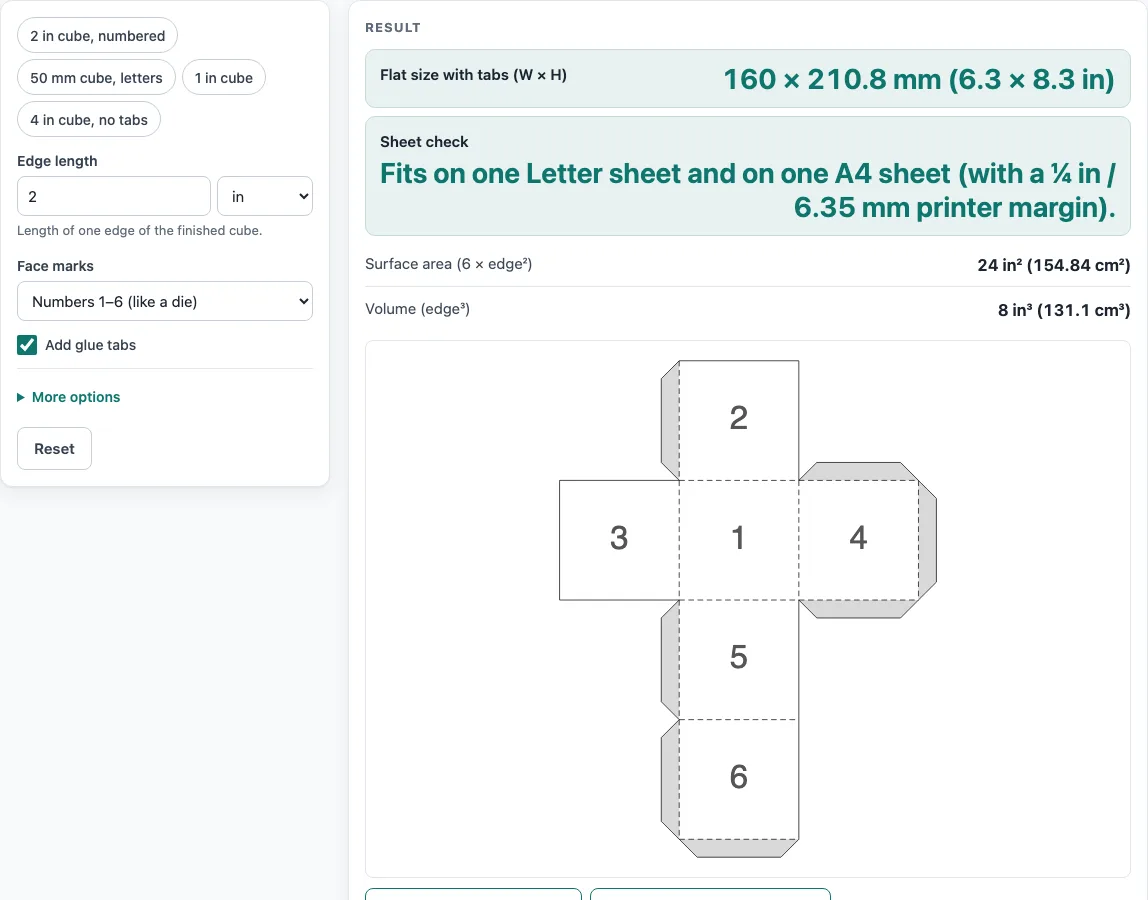
- Check the template drawing. Solid lines are cut lines, dashed lines are folds, and grey areas take glue.
- Click Download SVG (true size) for printing and design software, Download DXF (CAD / cutter) for plotters and cutting machines, or Print / save as PDF.
The example buttons above the form load ready-made settings: 2 in cube, numbered; 50 mm cube, letters; 1 in cube; and 4 in cube, no tabs. The defaults are a 2 in edge, numbers, tabs on and a 0.3 in tab width. Open How it was calculated to see the cross size, the tab size and the area and volume worked out with your own numbers. Copy link stores every input in the page address, so the same template reopens later. Copy result copies the result lines, and Reset restores the default values.
How do you make a 3D cube out of paper?
A cube has six square faces of the same size. To make one from paper, you draw those six squares in a single connected flat shape called a net, cut it out, fold it along the lines between the squares, and glue the edges together. The cross-shaped net, with six squares arranged three across and four down, is one of the 11 possible nets of a cube, and it is the one this tool draws. Unlike the box templates on this site, the cube adds no board-thickness allowance, so the edge you enter is the outside edge of a paper cube.
Glue tabs hold the cube together. The cross leaves 14 edges open, which form 7 joints when folded, and the tool puts one tab on each joint, so the net has 7 tabs. If a tab is wider than half the edge length, tabs can overlap when folded, so use a narrower tab.
If you number the faces like a die, opposite faces must add up to 7 (1 and 6, 2 and 5, 3 and 4). In the tool’s numbered net, 1 is the front, 6 the back, 2 the top, 5 the bottom, 3 the left and 4 the right.
The flat size follows from the edge length, which the tool calls a. The cross net is 3a wide and 4a tall. For a 2 in cube, a = 50.8 mm, so the cross is 152.4 × 203.2 mm. Adding 7.6 mm tabs makes the flat size 160 × 210.8 mm (6.3 × 8.3 in).
How do the cube’s surface area and volume work out?
A cube’s surface area is 6 × a², because there are six faces, each with area a². Its volume is a³. For a 2 in cube, the surface area is 6 × 2² = 24 in² (154.84 cm²), and the volume is 2³ = 8 in³ (131.1 cm³).
The sheet check compares the flat size with standard paper. The default 2 in cube fits on one Letter sheet and on one A4 sheet, allowing for a ¼ in (6.35 mm) printer margin.
A template is a starting point, not a finished result. Board thickness, grain direction, your printer and your cutter all change how the cube fits, so make a sample before a production run.
Sources
- Cube surface area 6a² and volume a³ (solid geometry)
- Paper sizes: A4 210 × 297 mm and A3 297 × 420 mm (ISO 216), US Letter 8.5 × 11 in and Tabloid 11 × 17 in (ANSI/ASME Y14.1)
- 1 in = 25.4 mm exactly (NIST SP 811)
Worked examples
| Input | Result |
|---|---|
| 2 in edge, faces: Numbers 1–6 (like a die) | Flat size 160 × 210.8 mm (6.3 × 8.3 in); surface area 24 in² (154.84 cm²) |
| 50 mm edge, faces: Letters A–F | Flat size 158 × 208 mm (6.22 × 8.19 in); surface area 23.25 in² (150 cm²) |
| 1 in edge, faces: Numbers 1–6 (like a die) | Flat size 81.3 × 106.7 mm (3.2 × 4.2 in); surface area 6 in² (38.71 cm²) |
| 4 in edge, faces: None (blank faces) | Flat size 304.8 × 406.4 mm (12 × 16 in); surface area 96 in² (619.35 cm²) |
Calculated by the tool above with these values.
Frequently asked questions
Is the calculator free, and is anything I type uploaded?
Yes, the tool is free and needs no sign-up. It runs entirely in your browser, and nothing you type is uploaded.
Can I use the results in commercial work such as quotes and bids?
Yes. Templates and results may be used in commercial work, including boxes and bags that are sold and files sent to printers and die makers. No attribution is needed.
Why does the tool say my cube net is too big for one sheet?
The net is larger than one Letter or A4 sheet. Use a shorter edge length, or download the SVG and print it on a larger sheet at a print shop.
Why does the tool warn that my tabs may overlap?
The tab is wider than half the edge length, so the tabs may overlap when folded. Set a narrower Tab width under More options.
What is the smallest cube I can fold and glue by hand?
The tool warns when an edge is under 10 mm, because that is too small to fold and glue by hand. Larger edges are easier to fold cleanly.
Should I print the template at 100 %?
Yes. Print at 100 %, not “fit to page”, so the template keeps its true size.
Related tools
- Pyramid template: use this when you need a pyramid net instead of a cube.
- Box template generator: use this to create a general box net from your own measurements.
- Pizza box dieline: use this for a pizza box flat pattern with the right folds and glue areas.
- Tuck box template: use this for a folding carton with a tuck-in top.
- Rectangle box template: use this for a box with a rectangular base instead of a square one.
- Gift box template: use this to make a box for presents or small items.
- Gable box template: use this for a box with a peaked, gable-style lid.
- Cylinder template: use it for a round tube or can-shaped net.
- All calculators: use this to browse every calculator on the site.