Cylinder Template Generator
Enter the diameter and height to get the wall rectangle and the two end discs with tabs, or switch to label mode for the wrap-around size of a can or tube.
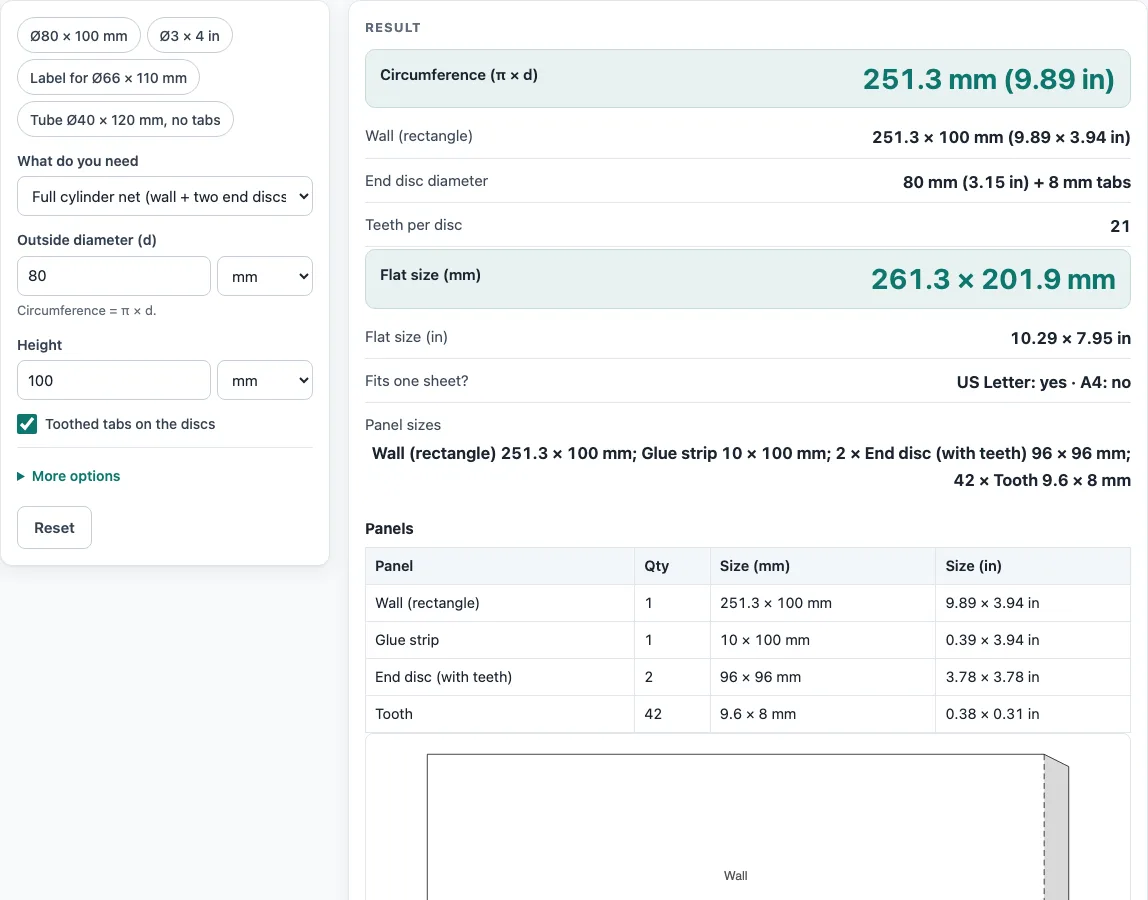
How to use the cylinder template generator
- In ‘What do you need’, choose ‘Full cylinder net (wall + two end discs)’ for a tube or round box, or ‘Can / tube label (wrap size only)’ for a wrap.
- Type the ‘Outside diameter (d)’ and ‘Height’. Pick mm, cm or in for each.
- Leave ‘Toothed tabs on the discs’ ticked for teeth that fold up inside the wall, or untick it for plain circles.
- Open ‘More options’ to change the ‘Glue strip / overlap’ (default 10 mm), the ‘Tab depth (leave empty for automatic)’ or the ‘Material thickness’ (default 0).
- Read ‘Circumference (π × d)’, ‘Wall (rectangle)’, ‘End disc diameter’, ‘Teeth per disc’, ‘Flat size (mm)’, ‘Flat size (in)’, ‘Fits one sheet?’ and ‘Panel sizes’. In label mode, read ‘Label size with overlap’ as well.
- To start from a sample, press ‘Ø80 × 100 mm’, ‘Ø3 × 4 in’, ‘Label for Ø66 × 110 mm’ or ‘Tube Ø40 × 120 mm, no tabs’.
- Press ‘Print / save as PDF’ and print at 100%, not fit to page. For a cutter or CAD program, press ‘Download SVG (true size)’ or ‘Download DXF (CAD / cutter)’.
To assemble, roll the wall into a tube and glue the strip, then fold the teeth and glue the discs inside. On the printed net, solid lines are cut, dashed lines are folded and grey areas take glue.
‘Copy link’ keeps all your inputs in one link, ‘Copy result’ copies the numbers, ‘How it was calculated’ shows each step, and ‘Reset’ clears the form.
How do I find the circumference of a cylinder for a paper wrap?
The circumference is π × d, where d is the outside diameter. It is the length the wall must be before it closes into a tube. For Ø80 mm it is 251.3 mm (9.89 in). For Ø3 in, convert to 76.2 mm first: π × 76.2 mm = 239.4 mm, which is 9.42 in.
How do I make a cylinder template with tabs on the circles?
The net is a rectangle π × d wide and h high, plus a glue strip on one edge, and two end discs of diameter d. Roll the wall into a tube, glue the strip under the other edge, fold the teeth up and glue the discs inside.
The tooth count is round(π × disc diameter ÷ 12 mm), at least 6 and at most 72, so an Ø80 mm disc gets 21 teeth. The default tab depth is 8 mm or 20% of the disc diameter, whichever is smaller. The tooth sizes and glue strip are the tool’s own design choices, not a standard.
How big should a label be for a can or tube?
The label width is the circumference plus the overlap, and the height is the can or tube height. For a Ø66 mm can with a 5 mm overlap, π × 66 = 207.3 mm, so the label is 212.3 mm wide. Choose ‘Can / tube label’ and read ‘Label size with overlap’.
What does material thickness change in a cylinder net?
With a thickness t, the wall is measured along the middle of the sheet, so its length is π × (d − t), and the discs are cut to d − 2t so they sit inside the wall. With t = 0 the wall is π × d and the discs are d.
How do I make a printable cylinder net?
Check that ‘Fits one sheet?’ says yes for Letter or A4. The default Ø80 × 100 mm net is 261.3 × 201.9 mm, which fits Letter but not A4. Then print at 100%. The discs sit in a row under the wall if the sheet allows it, or in a column to the right if not.
Sources
- Circumference = π × diameter = 2π × radius — Wikipedia, Circumference
- Lateral area of a right circular cylinder = 2πrh = (π × d) × h, the rectangle the wall unrolls into — Wikipedia, Cylinder
- Tooth count and depth, glue strip and the material-thickness correction are our own design parameters (shown in the steps)
- Paper sizes: A4 210 × 297 mm and A3 297 × 420 mm (ISO 216), US Letter 8.5 × 11 in and Tabloid 11 × 17 in (ANSI/ASME Y14.1)
- 1 in = 25.4 mm exactly (NIST SP 811)
Worked examples
| Input | Result |
|---|---|
| Ø 80 × 100 mm, full net | Circumference 251.3 mm (9.89 in); flat 261.3 × 201.9 mm; US Letter: yes · A4: no |
| Ø 3 × 4 in, full net | Circumference 239.4 mm (9.42 in); flat 249.5 × 199.7 mm; US Letter: yes · A4: no |
| Ø 66 × 110 mm, label | Circumference 207.3 mm (8.16 in); flat 212.3 × 110 mm; US Letter: yes · A4: yes |
| Ø 60 × 60 mm, full net | Circumference 188.5 mm (7.42 in); flat 196.9 × 125 mm; US Letter: yes · A4: yes |
Calculated by the tool above with these values.
Frequently asked questions
What if the flat size does not fit one sheet?
A warning appears. Print the net tiled across several sheets or on A3 or Tabloid, or send the SVG or DXF file to a plotter or cutter.
Why is my wall shorter than π × d?
You probably entered a material thickness. The wall is then π × (d − t), and the discs are cut to d − 2t. Leave the thickness at 0 for thin paper if you want the full π × d.
Can I use the cylinder template for commercial purposes or sell products on Etsy or Amazon KDP?
Yes. Templates you print or download may be used commercially, including for products sold on Etsy or Amazon KDP, royalty-free and with no attribution. The only limit is that you may not rebuild this generator as a competing service.
How do I make a cylinder for a can label?
Choose ‘Can / tube label (wrap size only)’, enter the can’s outside diameter and height, and set the glue strip to the overlap you want. For a 66 mm can with a 5 mm overlap the label is 212.3 mm long, which is π × 66 plus the overlap.
Is the calculator free, and is anything I type uploaded?
Yes, it is free, runs in your browser and needs no sign-up. Nothing you type is uploaded.
Related tools
- Box template generator: use this for a flat box with folds and walls, rather than a rolled tube.
- Cube template: use this when you need a six-sided box with equal sides.
- Pyramid template: use this for a pointed shape with a sloped face.
- Hexagon box template: use this for a box with six sides.
- Paper bag template: use this for a bag with a flat base.
- Gift box template: use this for a box that includes a separate lid.
- Label size chart: use this to compare common label sizes before you choose one.