Envelope Template Generator
Enter the card size and clearance, choose a diamond or pocket envelope, and print the net at true size or download it as SVG or DXF.
An envelope template is a flat drawing of an envelope that you cut out, fold and glue into a finished envelope. This envelope template generator works out the flat net for a card or envelope of any size, in diamond (four-flap) or pocket (baronial) style, and draws it to print or cut. It is free, runs in your browser and needs no sign-up.
Enter the size of the card you want to fit, or the size of the finished envelope. The tool adds your clearance, sets the flap sizes and reports the flat size in millimetres and inches. It also checks whether the net fits US Letter or A4 paper and names the matching standard envelope size, if there is one. Use it for greeting cards, invitations, photo prints or craft inserts, or whenever a standard envelope is too small or too large.
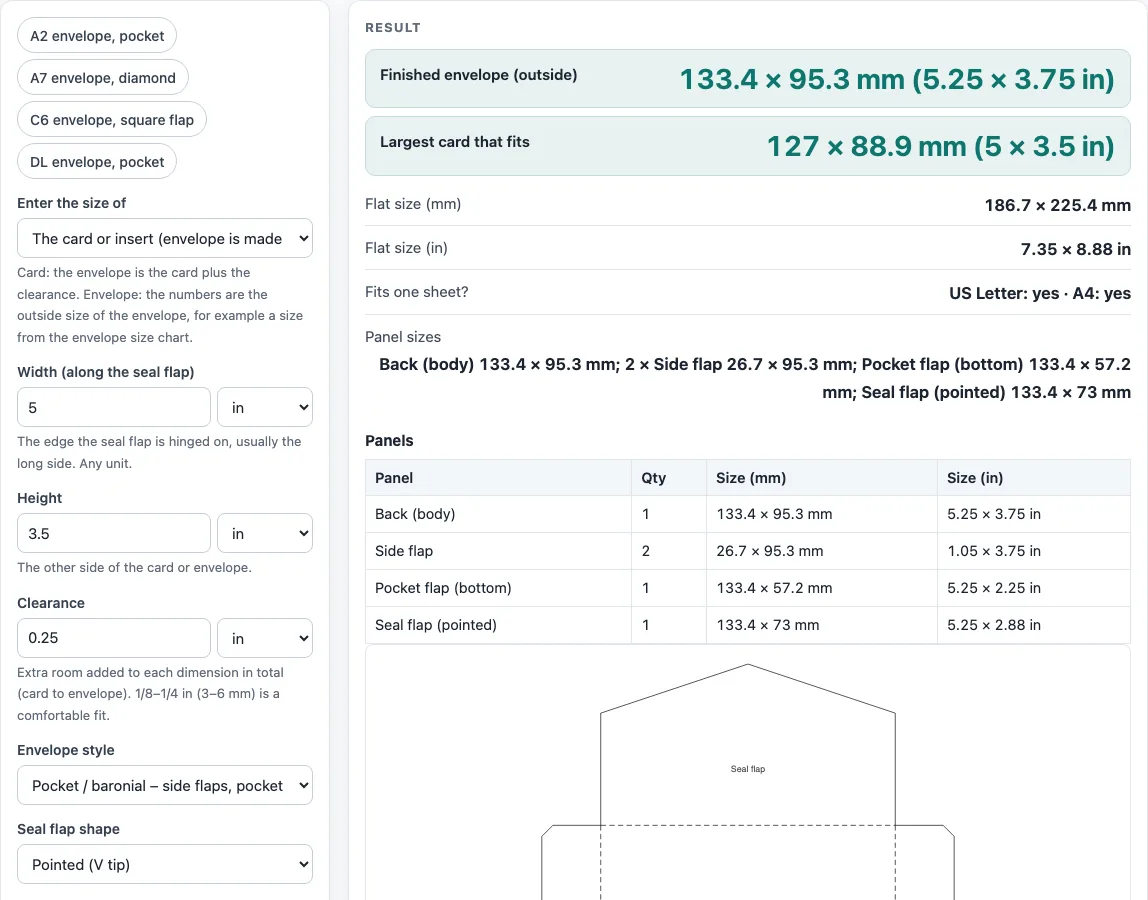
How to use the envelope template generator
- In ‘Enter the size of’, choose whether your numbers describe the card or the finished envelope (outside size).
- Type the ‘Width (along the seal flap)’, the edge the seal flap is hinged on, usually the long side.
- Type the ‘Height’. Pick mm, cm or in for each value.
- Set ‘Clearance’, the extra room added to each dimension in total.
- Choose the ‘Envelope style’: Diamond or Pocket / baronial. For a pocket envelope, also pick the ‘Seal flap shape’: Pointed (V tip) or Square (rounded corners).
- Set ‘Flap overlap’. A warning appears below 5 mm.
- For a pocket envelope you can open ‘More options’ and fill in ‘Side flap width’ or ‘Pocket flap height’. Leave them empty for the automatic sizes.
- Read ‘Finished envelope (outside)’, ‘Largest card that fits’, ‘Standard size’, ‘Flat size (mm)’, ‘Flat size (in)’, ‘Fits one sheet?’ and ‘Panel sizes’.
The example buttons (‘A2 envelope, pocket’, ‘A7 envelope, diamond’, ‘C6 envelope, square flap’, ‘DL envelope, pocket’) fill in sizes from the envelope size chart. ‘Download SVG (true size)’ saves a file in millimetres, and ‘Download DXF (CAD / cutter)’ saves a DXF file with the layers CUT, FOLD and GLUE. ‘Print / save as PDF’ prints the net at true size. ‘Copy link’ keeps your inputs, and ‘How it was calculated’ shows each step.
How do I make an envelope template for a card of any size?
Start with the card. The finished envelope is the card plus the clearance, added once to each dimension. If you already know the finished size, choose that in ‘Enter the size of’ and the largest card is the envelope minus the clearance. For example, a 162 × 114 mm envelope with 4 mm clearance takes a card up to 158 × 110 mm, and ‘Standard size’ reports it as C6. Each envelope side must be at least 30 mm, and the card at least 10 mm.
The flap sizes are this tool’s own design choices, not a standard. For the pocket style, each side flap is 20% of the width (at most half the width) and the pocket flap is 60% of the height (at most the height minus 10 mm). The seal flap has straight shoulders as deep as the opening above the pocket plus the flap overlap, so it covers the opening. A pointed flap adds a V tip of width ÷ 6, and a square flap has rounded corners of up to 8 mm. The flat size is (width + 2 side flaps) × (seal flap + height + pocket flap).
How do I make a diamond (four-flap) envelope template?
A diamond envelope has four triangular flaps on a rectangle, and each flap tip passes the centre by the flap overlap. The side flaps have a base equal to the height and a depth of width ÷ 2 + overlap. The top and bottom flaps have a base equal to the width and a depth of height ÷ 2 + overlap.
The flat size is (2 × width + 2 × overlap) × (2 × height + 2 × overlap). The bottom flap is the glued one, with grey glue bands 10 mm wide along its two slanted edges, and the top flap is the seal flap. The tool rejects an overlap of more than half the shorter side. On the net, solid lines cut, dashed lines fold and grey areas take glue.
Sources
- Envelope sizes used by the presets and the “same as” check are the data of the envelope size chart: US sizes from papersizes.org, US & North American envelope sizes (A2 4⅜ × 5¾ in, A7 5¼ × 7¼ in) and ISO 269 C-series sizes (C6 114 × 162 mm, DL 110 × 220 mm)
- Diamond and pocket layouts, flap sizes, overlaps and glue areas are plain geometry with our own design parameters (shown in the steps); no maker’s die is copied
- Paper sizes: A4 210 × 297 mm and A3 297 × 420 mm (ISO 216), US Letter 8.5 × 11 in and Tabloid 11 × 17 in (ANSI/ASME Y14.1)
- 1 in = 25.4 mm exactly (NIST SP 811)
Worked examples
| Input | Result |
|---|---|
| 5 × 3.5 in (card), pocket | Envelope 133.4 × 95.3 mm (5.25 × 3.75 in); flat 186.7 × 225.4 mm; US Letter: yes · A4: yes |
| 5 × 7 in (card), diamond | Envelope 133.4 × 184.2 mm (5.25 × 7.25 in); flat 292.1 × 393.7 mm; US Letter: no · A4: no |
| 162 × 114 mm (envelope), pocket | Envelope 162 × 114 mm (6.38 × 4.49 in); flat 226.8 × 238 mm; US Letter: no · A4: no |
| 100 × 70 mm (card), pocket | Envelope 104 × 74 mm (4.09 × 2.91 in); flat 145.6 × 175.3 mm; US Letter: yes · A4: yes |
Calculated by the tool above with these values.
Frequently asked questions
How big should an envelope be for a 5x7 card?
For a 5 × 7 in card with the default 0.25 in clearance, the envelope is 5.25 × 7.25 in, which the tool reports as A7. In diamond style with the default 0.5 in overlap the flat size is 11.5 × 15.5 in (292.1 × 393.7 mm). That is too large for Letter or A4, so print it tiled across sheets or send the SVG or DXF file to a plotter or cutter.
How much clearance should an envelope have around a card?
Clearance is the extra room added to each dimension in total, so the envelope equals the card plus the clearance. The default is 0.25 in, and the example buttons use 1/8 in for US sizes and 3 mm for ISO sizes. Cut one test copy from your own paper before you make a full set.
What is a pocket or baronial envelope and how is it cut?
A pocket envelope has two side flaps, a pocket flap that is glued over them, and a seal flap at the top that closes the opening. Cut along the solid lines, fold along the dashed lines and glue the grey areas. Fold the seal flap down over the pocket flap to close it.
Can I print my own envelope template at actual size?
Yes. Check ‘Fits one sheet?’ first, then use ‘Print / save as PDF’ and set your printer to 100% or actual size, not fit to page. If the net does not fit, print it tiled or use the SVG or DXF file.
Can I use the envelope template for commercial purposes or sell envelopes on Etsy or Amazon KDP?
Yes. Templates you print or download may be used commercially, including for products sold on Etsy or Amazon KDP, royalty-free and with no attribution. The only limit is that you may not rebuild this generator as a competing service.
Is the calculator free, and is anything I type uploaded?
Yes, it is free, runs in your browser and needs no sign-up. Nothing you type is uploaded.
Related tools
- Envelope size chart: use it to find a standard envelope size before you design a custom one.
- Label size chart: use it to size address or sticker labels to match your envelopes.
- Poly mailer sizes chart: use it to compare standard poly mailer sizes when you ship flat items.
- Mailer box sizes chart: use it to pick a shipping box when an envelope is too thin for the item.
- Box template generator: use it to make a custom folding box net from width, height and depth.
- Tuck box template: use it when you want a folding box with tuck flaps rather than an envelope.