Fragile Labels
Tick the handling marks you need, pick the paper and label size, and print a full sheet of labels or download it as SVG.
Fragile labels warn the people who carry a parcel that the contents break easily. This tool makes a full sheet of printable fragile labels, with a broken-glass symbol and the word FRAGILE, and five other common handling marks: this side up, handle with care, keep dry, do not stack and keep away from heat. You choose the marks, the paper (US Letter or A4) and the label size, and the tool fits as many labels on the sheet as the size allows.
Print the sheet on plain paper or sticker paper, or download it as an SVG file at true size. The tool is free, runs in your browser and nothing you type is uploaded.
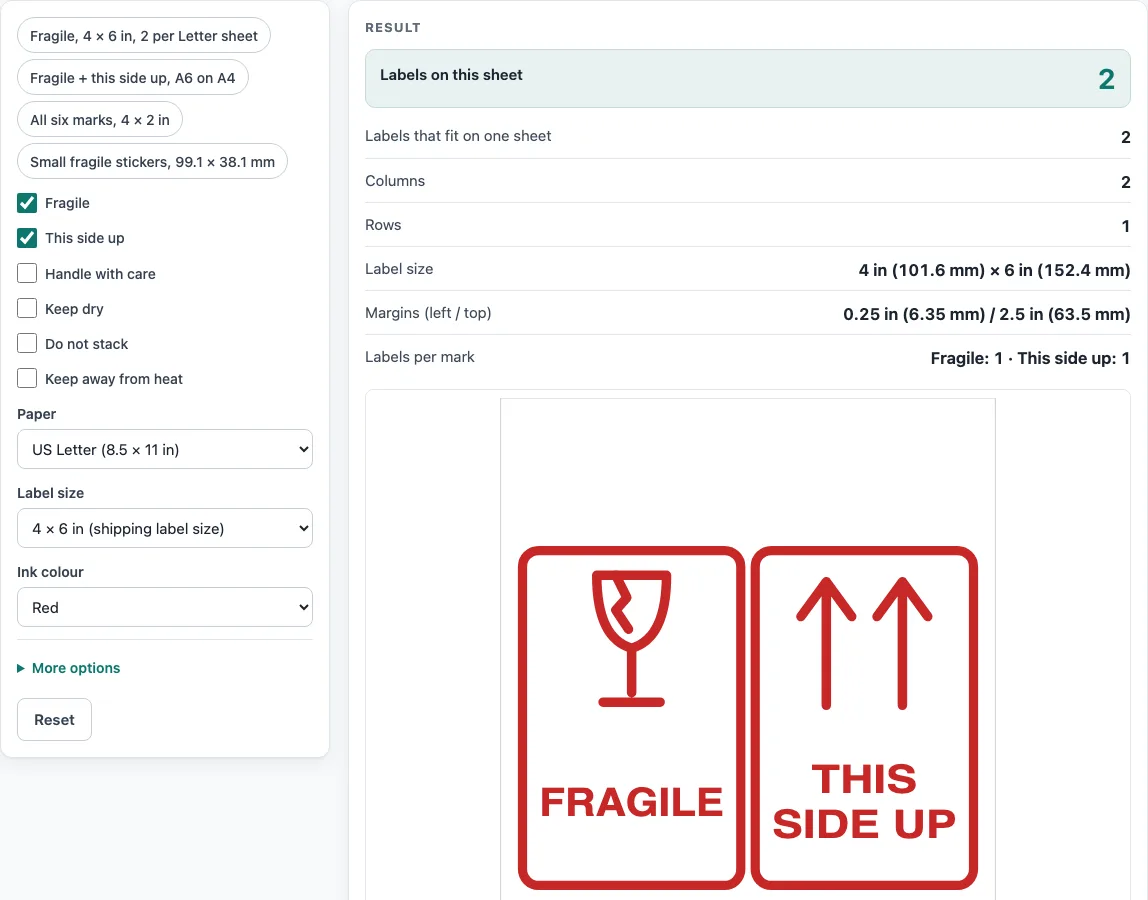
How to print fragile labels
- Tick the marks you want: Fragile, This side up, Handle with care, Keep dry, Do not stack and Keep away from heat. The labels repeat in that order across the sheet. “Fragile” and “This side up” are ticked at the start.
- Choose the Paper: US Letter or A4.
- Choose the Label size, for example “4 × 6 in (shipping label size)”, “A6, 105 × 148 mm” or “99.1 × 38.1 mm”. Pick “Custom size” to type a width and height in mm or inches.
- Pick the Ink colour: red, or black for a black-and-white printer.
- Open More options to set the Number of labels (leave it empty or 0 to fill the sheet) and a Gap between labels.
- Check the preview and the results: labels per sheet, columns and rows, label size and margins. A warning appears if a label does not fit or sits too close to the paper edge.
- Click Print the labels only, or Download SVG (true size). In the print dialog, set the scale to 100 % and turn off “fit to page”.
The presets, such as “Fragile, 4 × 6 in, 2 per Letter sheet” and “All six marks, 4 × 2 in”, fill in the whole form for you in one click. Copy link keeps your choices, and Reset clears them.
What do fragile labels mean?
A fragile label tells handlers that the contents can break if dropped, knocked or crushed, and should be handled with care. It is usually a broken-glass symbol with the word FRAGILE. The other marks on this page cover common handling instructions: keep the parcel upright (this side up), keep it out of rain (keep dry), do not put anything on top (do not stack), keep it away from heat, and lift it gently (handle with care).
What size should fragile labels be?
No single size is required by the tool; use one that fits the box. A 4 × 6 in label is a common shipping label size and gives two labels on a Letter sheet. A 4 × 2 in label gives ten, and the A6 size gives four on an A4 sheet. Small stickers, such as 99.1 × 38.1 mm, give fourteen on A4. Choose a larger size for large cartons, where the label must be read from a distance.
Are these the official ISO 780 symbols?
No. Wikipedia notes that standardized handling symbols are defined in standards such as ASTM D5445 and ISO 780. The drawings here are our own simple line art for the usual meanings, not the artwork from those standards. If a customer, carrier or contract requires the exact standard symbols, take the artwork from the standard.
How do I print labels at the right size?
Print at 100 %, which printers also call actual size, and turn off “fit to page” or “shrink to fit”. On plain paper, cut along the outline of each label and attach it with tape or glue. For sticker paper, choose a label size that matches your sheet. The tool centres the grid on the page, and many printers cannot print within about 4.5 mm of the paper edge, so it warns when a label sits that close. Print one test sheet before you print a batch.
How many labels fit on a sheet?
The number of columns is the page width plus the gap, divided by the label width plus the gap, rounded down; rows work the same way. On Letter paper (8.5 × 11 in) a 4 × 6 in label gives 2 columns by 1 row, a 4 × 3⅓ in label gives 6, and a 4 × 2 in label gives 10. On A4 paper, A6 gives 4, a 99.1 × 67.7 mm label gives 8 and a 99.1 × 38.1 mm label gives 14. The results panel shows the exact grid for your choice.
Sources
Facts used by this tool (checked October 2026):
- Packaging and labeling, Wikipedia — standardized handling symbols are defined in ASTM D5445 and ISO 780
- NIST Special Publication 811 — 1 inch = 25.4 mm exactly
- ANSI/ASME Y14.1 (US Letter, 8.5 × 11 in) and ISO 216 (A4, A5 and A6) — paper sizes used for the layout
Worked examples
| Input | Result |
|---|---|
| US Letter, 4 × 6 in (shipping label size), 2 mark(s) | 2 labels per sheet (2 × 1) |
| A4, A6, 105 × 148 mm, 4 mark(s) | 4 labels per sheet (2 × 2) |
| US Letter, 4 × 2 in, 1 mark(s) | 10 labels per sheet (2 × 5) |
Calculated by the tool above with these values.
Frequently asked questions
What does a fragile label look like?
Ours has a red border, a broken wine glass symbol and the word FRAGILE in large capital letters. You can switch the ink to black.
Can I print fragile labels on plain paper?
Yes. Print the sheet at 100 % scale, cut along the outline of each label and attach it with tape. Sticker paper saves the cutting if your sheet size matches one of the label sizes.
How many fragile labels per page can I print?
It depends on the label size and the paper. Two 4 × 6 in labels fit on a Letter page, ten 4 × 2 in labels fit on a Letter page, and four A6 labels fit on an A4 page. Use the “Number of labels” option to print fewer.
Can I print different marks on one sheet?
Yes. Tick several marks and the labels repeat through them in order, for example fragile, this side up, keep dry, fragile, this side up and so on. Tick one mark to fill the sheet with it.
Can I use a custom label size?
Yes. Choose “Custom size” and enter the width and height in mm or inches. If the label is larger than the paper, the tool warns you and shows no sheet.
Is this tool free, and is anything I type uploaded?
Yes, it is free and needs no sign-up. It runs in your browser, and nothing you type is uploaded.
Can I use the labels commercially or sell goods with them on?
Yes. You may use the labels in commercial work, including on parcels you ship and sell, without attribution and without royalties. They are generic handling labels, not a guarantee of how a carrier will handle a parcel.
Can I save the labels as a file?
Yes. Click “Download SVG (true size)” to save the whole sheet. The file opens in a browser and in most design programs, and prints at the sheet’s real size.
Related tools
- Label size chart: use it to find common sheet-label sizes and make an outline template.
- Mailer box sizes chart: use it to compare standard mailer box sizes.
- Poly mailer sizes chart: use it to compare standard poly mailer sizes.
- Box size calculator: use it to find the box size you need.
- Envelope size chart: use it to check envelope sizes.
- All tools: use it to browse every tool on this site.