Gable Box Template
Type the inside size and roof height to get a printable gable box with a carry handle.
The gable box template turns the inside size of a box into a printable flat net with a sloped roof and a carry handle. Enter the inside length, width and wall height, plus a roof height and a handle height, and the tool draws the cut, fold and glue lines at true size. It is free, runs in your browser, needs no sign-up, and uploads nothing you type.
Use it for a printable gable box template for gifts, treats or party favors, or a large gable box. Download the net as a true-size SVG or DXF file for a home printer or a cutting machine; for a gable box template for Cricut, check that your cutting software opens the file. The roof, handle and bottom shapes are this tool’s own design, so a test print is recommended.
How to use the gable box template
- Pick a unit for each length from its menu: mm, cm or in. Material thickness offers mm or in.
- Enter Inside length (L), the width of the front and back walls. These are the walls that carry the handle.
- Enter Inside width (W), the width of the side walls. The roof slopes over this width.
- Enter Inside wall height (H), the height of the straight walls below the roof.
- Enter Roof height (R), how high the ridge sits above the top of the walls. The tool’s hint suggests roughly a third to half of the width, and it warns below a quarter of the width (very flat) or above the full width (steep).
- Enter Handle height. The tool needs at least 12 mm, and its hint says 25–35 mm gives room for fingers.
- Open More options to change Glue flap width (12 mm by default) and Material thickness (0.3 mm by default).
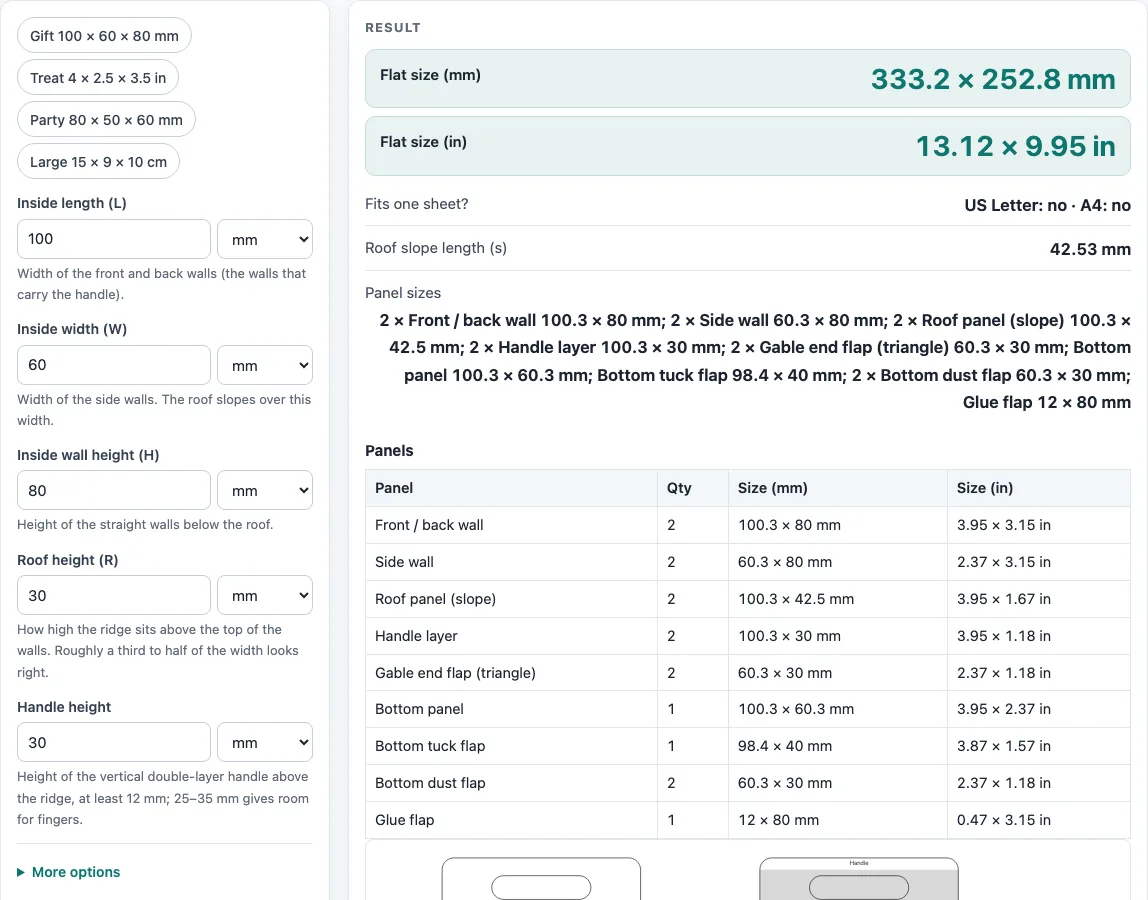
- Read Flat size (mm), Flat size (in), Fits one sheet?, Roof slope length (s) and Panel sizes, and check any warning.
- To start from a ready size, press an example: Gift 100 × 60 × 80 mm, Treat 4 × 2.5 × 3.5 in, Party 80 × 50 × 60 mm or Large 15 × 9 × 10 cm.
Use Download SVG (true size) or Download DXF (CAD / cutter) for the template file. Print / save as PDF prints the inputs, results, steps and template; print at 100 %, not “fit to page”. Copy link keeps every input in the address, and Reset restores the defaults.
How do you make a gable box?
A gable box is built from one flat net. Four wall panels form a tube, a bottom panel closes the base, and the front and back walls continue upward as two sloped roof panels that meet at a ridge. Above the ridge each roof panel continues straight up as a handle layer. The two layers are glued face to face, and each carries a rounded finger slot. The two side walls end in triangular gable flaps that fold inward under the roof.
Each wall panel is the inside size plus the material thickness, t, because the sheet goes round the outer corner of each fold. For the default 100 × 60 × 80 mm box with 0.3 mm card, the front and back walls are 100.3 mm wide and the sides are 60.3 mm wide.
The roof slope is the diagonal from the top of a wall to the ridge. The ridge sits R above the wall top and half the width inwards, so:
s = √(R² + ((W + t) ÷ 2)²)
With R = 30 mm, this gives √(30² + 30.15²) = 42.5 mm.
The bottom is a simple bottom, not a crash-lock. The bottom panel is hinged to the front wall, a tuck flap on its far edge tucks inside the back wall, and a dust flap on each side wall folds under the bottom panel. Add tape if the box will hold heavy contents.
The default net is 12 + 2 × 100.3 + 2 × 60.3 = 333.2 mm wide, and 72.5 + 80 + 100.3 = 252.8 mm tall: roof and handle (42.5 + 30), wall, then bottom and tuck flap (60.3 + 40). That does not fit US Letter or A4, but the tool shows it fits A3 and Tabloid.
What roof height works for a gable box?
The tool’s hint suggests a roof height of roughly a third to half of the box width. A roof below a quarter of the width is very flat, and the handle will not stand up well. A roof higher than the width makes the slope panels very long. The tool warns in both cases.
Sources
- Panel sizes, flaps and curves are plain geometry (no packaging standard is copied); FEFCO style codes are used only as names; roof slope by Pythagoras
- Paper sizes: A4 210 × 297 mm and A3 297 × 420 mm (ISO 216), US Letter 8.5 × 11 in and Tabloid 11 × 17 in (ANSI/ASME Y14.1)
- 1 in = 25.4 mm exactly (NIST SP 811)
Worked examples
| Input | Result |
|---|---|
| 100 × 60 × 80 mm, roof 30 mm | Flat 333.2 × 252.8 mm; US Letter: no · A4: no |
| 4 × 2.5 × 3.5 in, roof 1.25 in | Flat 344.1 × 273.9 mm; US Letter: no · A4: no |
| 80 × 50 × 60 mm, roof 25 mm | Flat 274 × 201 mm; US Letter: no · A4: no |
| 15 × 9 × 10 cm, roof 4 cm | Flat 493.2 × 340.6 mm; US Letter: no · A4: no |
Calculated by the tool above with these values.
Frequently asked questions
Is the gable box template free, and is anything I type uploaded?
Yes. The tool is free, runs entirely in your browser, and needs no sign-up. Nothing you type is uploaded.
Can I use the gable box template results in commercial work such as quotes and bids?
Yes. You may use templates and results in commercial work, including boxes and bags that are sold and files sent to printers and die makers. No attribution is needed.
Why does the flat net not fit on my paper?
The tool shows a warning when the net is larger than one US Letter or A4 sheet with a 1/4 in margin. Print it tiled or on A3 or Tabloid paper, or send the SVG or DXF file to a plotter or cutter.
Should I make a test sample before a production run?
Yes. Board thickness, grain direction, your printer and your cutter all change the fit, and the roof, handle and bottom geometry are this tool’s own conventions. For thickness over 3 mm the tool warns that panels will not fold at a sharp line, so test those first.
What print scale should I use for the gable box template?
Print at 100 %, not “fit to page”, so the template stays at its real size. Measure one edge against the size shown before you cut.
Related tools
- Rectangle box template: use it for a plain box with straight walls and no sloped roof.
- Gift box template: use it when you are planning a box mainly for presents.
- Pillow box template: use it for a box with a soft, pillow-shaped form.
- Paper bag template: use it when you need a bag rather than a rigid box.
- Box template generator: use it to compare different box shapes before choosing one.
- Pizza box dieline: use it for a flat-folding box sized for pizza.
- Tuck box template: use it for a box with a tuck-in top and bottom.
- All calculators: use it to browse every calculator on the site.