Mailer Box Sizes Chart and Finder
See common mailer box dimensions, or enter your item to find the boxes that fit and how much space is left.
How to use the Mailer Box Size Calculator
- Enter the Item length (L). Choose inches, mm or cm from its unit menu. The item may be turned, so L and W can be entered either way round.
- Enter the Item width (W) and choose its unit.
- Enter the Item height (H). The item lies flat on the floor of the box, and height is measured upward.
- Enter the Clearance per side. Length and width get this amount on both sides, and height gets it once, on top. Use 0 for a snug fit.
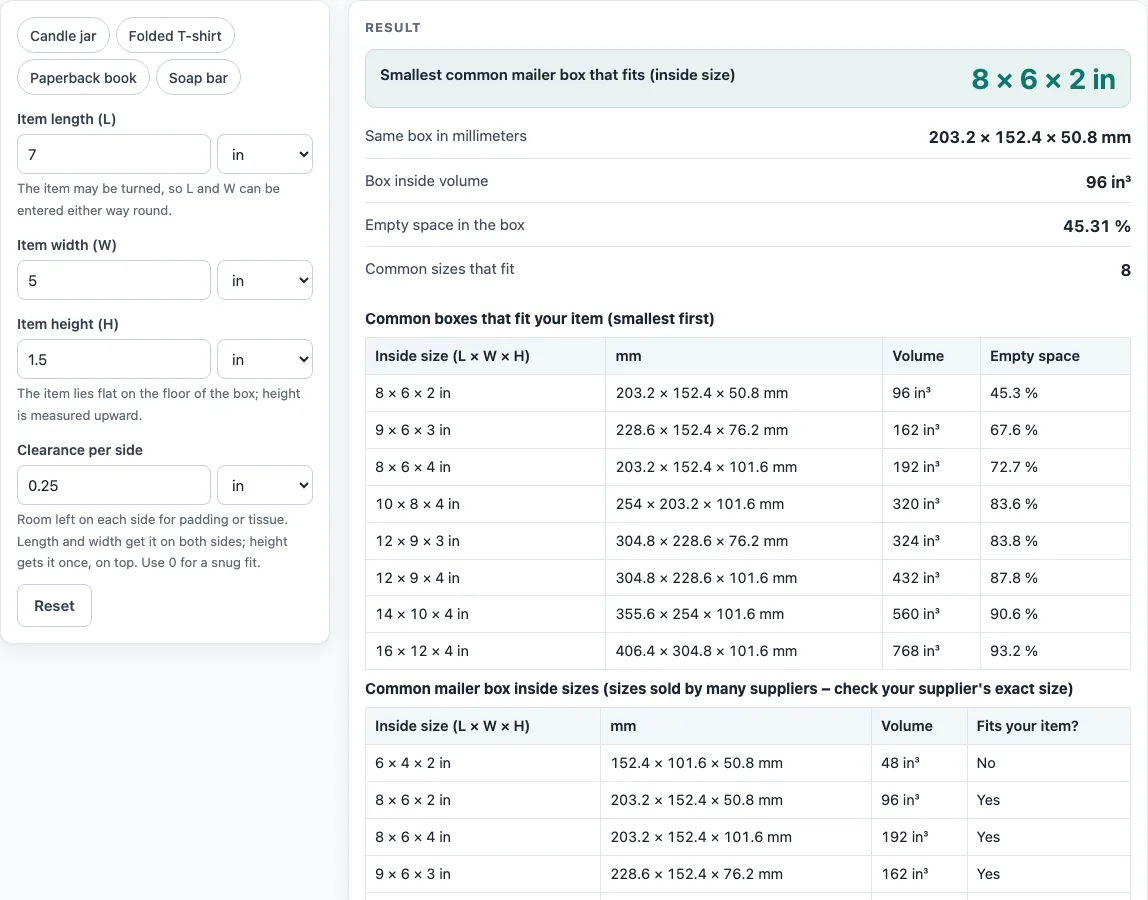
- Read the result. It shows the “Smallest common mailer box that fits (inside size)”, “Same box in millimeters”, “Box inside volume”, “Empty space in the box” and “Common sizes that fit”. Read any warning shown below these rows.
- Look at the two tables under the result. One lists the boxes that fit, smallest first. The other is the full chart with a “Fits your item?” column.
- Open “How it was calculated” to see each step worked out with your own numbers.
To start quickly, press one of the example buttons above the form: Candle jar, Folded T-shirt, Paperback book or Soap bar. Use “Copy result” to copy the result lines, “Copy link” to copy a page address that holds all your inputs, “Print / save as PDF” for a printout, and “Reset” to return to the default values.
What size mailer box do I need?
A mailer box needs an inside length and width at least as large as the item’s two sides plus clearance on both sides, and an inside height at least as large as the item’s height plus clearance on top. The item lies flat and may be turned 90° in the horizontal plane, so the longer side can run along either direction.
For the default example of 7 in × 5 in × 1.5 in with 0.25 in clearance, the box needs 7 + 2 × 0.25 = 7.5 in inside length, 5 + 2 × 0.25 = 5.5 in inside width, and 1.5 + 0.25 = 1.75 in inside height.
What are common mailer box sizes?
The chart lists nine common inside sizes, in inches: 6 × 4 × 2, 8 × 6 × 2, 8 × 6 × 4, 9 × 6 × 3, 10 × 8 × 4, 12 × 9 × 3, 12 × 9 × 4, 14 × 10 × 4 and 16 × 12 × 4. The tool shows each one in millimeters too, with its volume. These are common sizes sold by many suppliers, not an official list, and inside sizes differ between suppliers.
How does the tool choose the smallest box?
The tool checks the common sizes that meet those minimums and picks the one with the smallest volume. In the default example, the smallest fitting box is 8 × 6 × 2 in, and 8 of the common sizes fit. If no common size is large enough, the tool reports the minimum inside size you would need to ask a supplier for.
For example, a candle jar of 3.5 × 3.5 × 4 in with 0.25 in clearance needs at least 4 × 4 × 4.25 in inside. No common box is that deep, so the tool says so. A folded T-shirt of 11 × 8 × 2 in fits the 12 × 9 × 3 in box, and a 4 × 3 × 1.25 in soap bar fits the 6 × 4 × 2 in box.
How much empty space is in a box?
Empty space is found with this formula: 1 − item volume ÷ box volume. For the default example, the item volume is 52.5 in³ and the box volume is 96 in³, so the empty space is 1 − 52.5 ÷ 96 = 45.3 %. A high percentage means that much of the box holds air, which can add shipping cost and let the item move around. The tool warns when more than 60 % would be empty. Filler can reduce this gap, and a closer custom size can remove it.
Sources
- Custom Box Makers, guide on mailer box sizes — 8 × 6 × 2, 9 × 6 × 3, 12 × 9 × 3, 14 × 10 × 4, 16 × 12 × 4 in
- Packwire, mailer box sizes — 8 × 6 × 4, 10 × 8 × 4, 12 × 9 × 4 in and the 6 × 4 × 2 to 14 × 10 × 4 range
- 1 in = 25.4 mm exactly (NIST SP 811)
Worked examples
| Input | Result |
|---|---|
| 7 in × 5 in × 1.5 in, 0.25 in | 8 × 6 × 2 in, 45.3 % empty |
| 150 mm × 100 mm × 30 mm, 5 mm | 8 × 6 × 2 in, 71.4 % empty |
| 11 in × 8 in × 3.5 in, 0.25 in | 12 × 9 × 4 in, 28.7 % empty |
| 9 in × 6 in × 3 in, 0 in | 9 × 6 × 3 in, 3.33 × 10⁻¹⁴ % empty |
Calculated by the tool above with these values.
Frequently asked questions
What size mailer box do I need?
Find the item’s length, width and height, then add the clearance you want on each side. Enter these values in the calculator, and it returns the smallest common box that fits with that clearance.
Is the calculator free, and is anything I type uploaded?
Yes, the calculator is free, runs entirely in your browser, and needs no sign-up. Nothing you type is uploaded.
Can I use the results in commercial work?
Yes. Results may be used in commercial work, including quotes, and no attribution is needed. Check any terms your client sets.
Are the sizes on the chart a standard?
No. They are common sizes sold by many suppliers, not an official standard. Check the supplier’s exact inside size before you order.
What does “No common box is large enough” mean?
It means none of the common sizes can hold your item with the clearance you entered. The warning shows the minimum inside size you need, and you can ask a supplier for a custom box of that size.
Can I enter the item sides in any order?
Yes. The item may be turned, so length and width can go either way round. Height is the side that points up from the floor of the box.
Why does the tool warn that the box is much deeper than my item?
Every box that fits is at least 2 in (50 mm) taller than your item needs. A shallower custom box would use less material.
Does the tool draw a box template?
No. It gives inside sizes only. For a folding template, use the box template generator linked below.
Related tools
- Box size calculator: Use it to find inside and outside box sizes when you are not limited to mailer boxes.
- Poly mailer sizes chart: Use it to compare sizes when a flexible bag suits your item better than a box.
- Envelope size chart: Use it to check sizes for flat items that go in an envelope.
- Box template generator: Use it to create a box template when you need a custom shape.
- Tuck box template: Use it to make a folding box template for retail packaging.