Paper Bag Template
Enter the bag's width, gusset and height to get a flat-bottom paper bag pattern and the sheet size it needs.
This paper bag template tool turns three measurements into a printable flat-bottom bag pattern: the front width, the side gusset and the height. Once you enter them, it shows the flat sheet size you need, draws the cut lines, fold lines and glue areas at actual size, and exports the file for printing or cutting. Free to use, it runs in your browser and needs no sign-up.
Values can be entered in inches, millimeters or centimeters, which suits a small gift bag, a lunch bag, a grocery bag or any custom size. Beside the pattern, a list shows which standard sheets (Letter, A4, Tabloid, A3) the flat bag fits. Handles are not drawn, so add them yourself. Before a production run, make a test bag from your own paper.
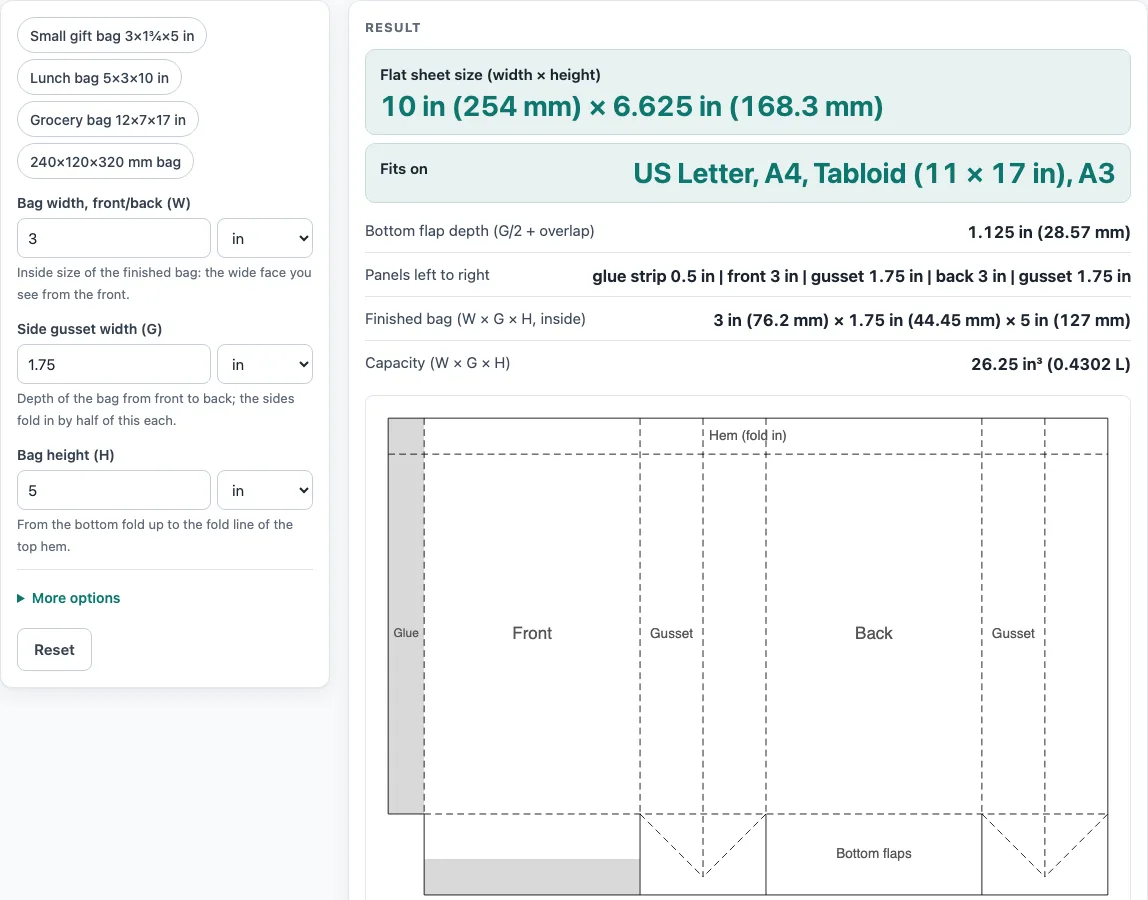
How to use the paper bag template tool
- Choose a unit for each value from its drop-down: in, mm or cm. For a quick start, click an example: Small gift bag 3×1¾×5 in, Lunch bag 5×3×10 in, Grocery bag 12×7×17 in or 240×120×320 mm bag.
- Enter the front width in Bag width, front/back (W). It is the inside measurement of the wide face seen from the front.
- Put the depth from front to back into Side gusset width (G). Each side tucks in by half of this figure.
- Fill in the bag height in Bag height (H), measured from the bottom fold up to the fold line of the top hem.
- Expand More options to adjust Top hem (fold-over), Glue strip width and Bottom flap overlap. If you want no top fold, set the hem to 0.
- Check Flat sheet size (width × height), Fits on, Bottom flap depth (G/2 + overlap), Panels left to right, Finished bag and Capacity. Should a warning show up, adjust the value it refers to before cutting.
- Store the template via Download SVG (true size) for design software, or Download DXF (CAD / cutter) for CAD programs, plotters and cutting machines. For printing, select Print / save as PDF and set it to 100 %, not “fit to page”.
Copy result copies the result lines, while Copy link copies an address holding every input. Reset brings back the default values. How it was calculated shows each step using your own numbers.
How do you make a paper bag?
A flat-bottom paper bag is made from one flat sheet that folds into a box shape. The front and back panels form the wide faces, and two side gussets fold inward along their centre lines. The bottom is closed by two flaps that are glued together.
Work in a set order. Cut the solid outline, then crease the dashed lines so the paper folds cleanly without cracking. Fold each gusset inward, then glue the strip inside the last panel to close the side seam. Fold in the bottom gussets, and finally fold the front and back bottom flaps over each other and glue the overlap. Thin paper and thick board fold differently, so test the crease on scrap first.
How is the sheet size for a paper bag template worked out?
The sheet is two fronts and two gussets wide, plus the glue strip. The tool uses three steps: sheet width = glue strip + 2 × W + 2 × G, bottom flap depth D = G ÷ 2 + overlap, and sheet height = hem + H + D.
The default example is a 3 in wide bag with a 1.75 in gusset and a 5 in height. With a 0.5 in hem, a 0.5 in glue strip and a 0.25 in overlap, the bottom flap depth is 1.75 ÷ 2 + 0.25 = 1.125 in (28.57 mm). The sheet is 10 in (254 mm) wide and 6.625 in (168.3 mm) high. Each bottom flap passes the middle of the base by the overlap, so the two flaps overlap by twice that amount, which is the area you glue.
What do the lines on a paper bag template mean?
Solid lines are cut lines, dashed lines are folds, and grey areas take glue. Cut along the solid lines, crease the dashed lines before folding, and put adhesive only on the grey areas.
Folds usually crack less when they run parallel to the paper grain, so check the grain of kraft or brown paper before you cut, and test a fold on scrap. If the glue area is too narrow for your adhesive, increase the glue strip width under More options and check the new sheet size.
Sources
- Panel sizes, flaps and curves are plain geometry (no packaging standard is copied); FEFCO style codes are used only as names; flat-bottom (SOS) bag layout
- Paper sizes: A4 210 × 297 mm and A3 297 × 420 mm (ISO 216), US Letter 8.5 × 11 in and Tabloid 11 × 17 in (ANSI/ASME Y14.1)
- 1 in = 25.4 mm exactly (NIST SP 811)
Worked examples
| Input | Result |
|---|---|
| Bag 3 in wide × 1.75 in gusset × 5 in high | sheet 10 in (254 mm) × 6.625 in (168.3 mm) |
| Bag 5 in wide × 3 in gusset × 10 in high | sheet 16.75 in (425.5 mm) × 13 in (330.2 mm) |
| Bag 240 mm wide × 120 mm gusset × 320 mm high | sheet 735 mm (28.94 in) × 425 mm (16.73 in) |
| Bag 100 mm wide × 50 mm gusset × 200 mm high | sheet 315 mm (12.4 in) × 255 mm (10.04 in) |
Calculated by the tool above with these values.
Frequently asked questions
Is the calculator free, and is anything I type uploaded?
Yes, the tool is free, runs entirely in your browser and needs no sign-up. Nothing you type is uploaded.
Can I use the results in commercial work such as quotes and bids?
Yes. Templates and results may be used in commercial work, including boxes and bags that are sold and files sent to printers and die makers. No attribution is needed.
Can I print a paper bag template on A4 or A3 paper?
Yes, if the sheet fits. The Fits on result lists every one of Letter, A4, Tabloid and A3 that the flat sheet fits inside a 1/4 in margin, in either orientation. Our default 3 × 1¾ × 5 in bag fits all four. For the 100 × 50 × 200 mm bag (315 × 255 mm), only Tabloid and A3 work, and the Lunch bag preset (16.75 × 13 in) fits none of them.
What if the flat sheet is larger than my paper?
If it fits no standard sheet, the tool warns you. Use the SVG or DXF file at true size and cut from a roll or large sheet, or scale the bag down.
Does the tool know about kraft or brown paper?
No. It works from sizes only, so enter your bag size and use any paper. Make a test bag first, because paper weight, grain direction, your printer and your cutter change the fit.
Related tools
- Rectangle box template: best for a straight-sided box, not a bag with gussets.
- Gift box template: handy when you want a closed gift box with a lid or fold-over top.
- Gable box template: makes a box with a peaked lid.
- Pillow box template: suits a small, soft-sided box that holds one item.
- Box template generator: lets you compare several box styles before you pick one.
- Pizza box dieline: fits a food box with a flat base and fold-over lid.
- Tuck box template: a folding carton that closes with tuck flaps.
- All calculators: browse every tool on the site.