Poly Mailer Sizes Chart and Size Finder
See common poly mailer sizes, or enter your item's size to find the smallest mailer bag that fits.
How to use the poly mailer sizes tool
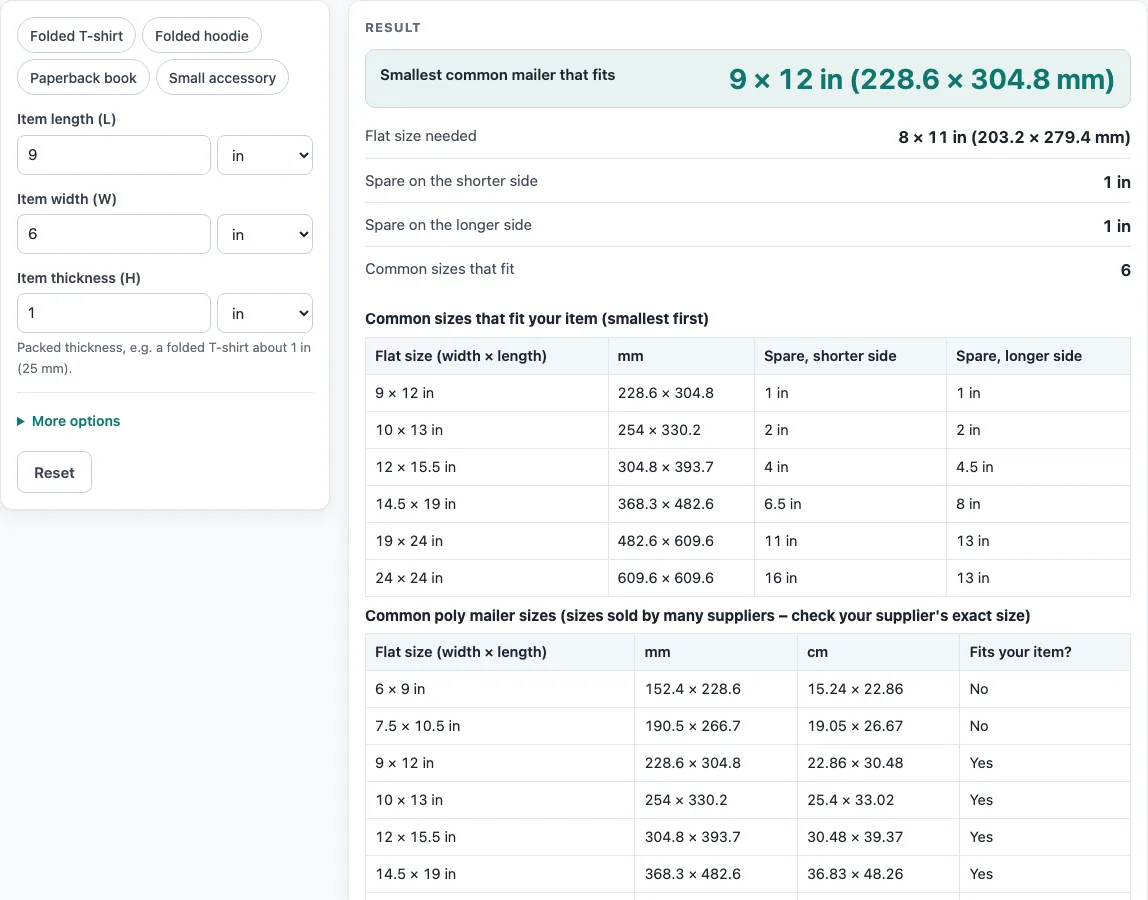
- Measure your item. Note its length (L), width (W) and packed thickness (H), such as a folded shirt. You can also click an example button (Folded T-shirt, Folded hoodie, Paperback book or Small accessory) to see how the tool works.
- Enter the length in the “Item length (L)” field. Choose inches, mm or cm from its unit menu.
- Enter the width in the “Item width (W)” field and set its unit.
- Enter the thickness in the “Item thickness (H)” field. Use the packed thickness, not the thickness of the item when it is spread out.
- Open “More options” if you need to change the “Seal and flap allowance”. The default is 1 in (25 mm). Use more for a long flap or stiff film.
- Read the result. It shows the “Smallest common mailer that fits”, the “Flat size needed”, the spare room on the shorter and longer sides, and the number of common sizes that fit. Read any warning below it.
- Look at the tables under the result. One lists the sizes that fit, smallest first. The other is the full chart with a “Fits your item?” column.
- Use “Copy result” for the result lines, “Copy link” to share a page that reopens with your inputs, “Print / save as PDF” for a printout, or “Reset” to restore the defaults. “How it was calculated” shows each step.
What size poly mailer do I need?
A poly mailer must be at least as wide and as long as your item, plus its thickness, plus room to seal. The tool uses this approximation, which is a guide and not a standard: flat width is at least W + H + allowance, and flat length (from the opening to the bottom) is at least L + H + allowance. Thickness is added because a packed item takes up more space than its flat outline.
The item can be turned by 90°, so the tool compares the two sides in order: the smaller required side with the smaller bag side, and the larger with the larger. For a 9 × 6 × 1 in item with the default 1 in allowance, the flat size needed is 8 × 11 in. The smallest common size that fits is 9 × 12 in, which leaves 1 in spare on each side. Six of the eight common sizes fit.
What size poly mailer fits clothes?
Fold the garment the way you will ship it, then measure its length, width and packed thickness. A folded T-shirt of 11 × 8 × 1 in needs a flat size of 10 × 13 in, so the 10 × 13 in mailer is the smallest common size that fits. It leaves no spare room, so the tool warns that a stiff or bulky item may not close. A folded hoodie of 12 × 10 × 3 in needs 14 × 16 in, which takes the 14.5 × 19 in mailer.
What are common poly mailer sizes?
Poly mailers are measured flat as width × length. Length runs from the opening to the bottom, not including the adhesive flap. When you compare bags, make sure both numbers are measured the same way.
The chart lists these common sizes, sold by many suppliers: 6 × 9, 7.5 × 10.5, 9 × 12, 10 × 13, 12 × 15.5, 14.5 × 19, 19 × 24 and 24 × 24 in. They are not an official standard, and suppliers differ slightly, so check the exact size before you order. If your item needs a flat bag larger than these, the tool shows a warning. In that case, ask your supplier for a custom size or ship in a box.
How big are shipping bags and padded mailers?
Shipping bag sizes follow the same rule: measure the item, add its thickness and the seal allowance, and compare the result with the chart. The chart covers plain flat mailers. A bubble-lined mailer has a thicker wall, so raise the allowance, and use the supplier’s inside size.
Sources
- Stamps.com Supplies, white poly mailer — 6 × 9 to 24 × 24 in sizes
- Uline poly mailers — 6 × 9, 12 × 15½, 14½ × 19, 19 × 24 in
- 1 in = 25.4 mm exactly (NIST SP 811)
Worked examples
| Input | Result |
|---|---|
| 9 in × 6 in × 1 in | 9 × 12 in (228.6 × 304.8 mm) |
| 10 in × 8 in × 1.5 in | 12 × 15.5 in (304.8 × 393.7 mm) |
| 200 mm × 150 mm × 20 mm | 7.5 × 10.5 in (190.5 × 266.7 mm) |
| 14 in × 11 in × 2 in | 14.5 × 19 in (368.3 × 482.6 mm) |
Calculated by the tool above with these values.
Frequently asked questions
Is the tool free, and is anything I type uploaded?
Yes, the tool is free. It runs entirely in your browser and needs no sign-up. Nothing you type is uploaded.
Can I use the results in commercial work?
Yes. Results may be used in commercial work, including quotes, and no attribution is needed. Check any terms your client sets.
What does the seal and flap allowance do?
It adds extra flat size to both the width and the length requirement, giving room to seal the bag. The default is 1 in (25 mm). Increase it for a long flap or a stiff film.
Why does the tool warn that there is less than 0.5 in (13 mm) to spare?
A soft item can be squeezed into a bag with that little room, but a stiff or bulky item may not close. In that case, choose the next size up.
Why does the tool say my thickness is larger than my length or width?
The thickness is larger than the item’s length or width. This usually means the values are in the wrong fields, so check that you entered length, width and thickness in the correct boxes.
Should I test a mailer before ordering a large batch?
Yes. The result is a guide. Film thickness, flap length and how soft the item is all change the fit, so try one bag first.
Related tools
- Box size calculator: Use this when your item needs a rigid box instead of a flexible mailer.
- Mailer box sizes chart: Compare common mailer box dimensions when you are choosing between box sizes.
- Envelope size chart: Check envelope dimensions for flat, paper-based mail.
- Box template generator: Create a cut-and-fold template for a custom box.
- All calculators: Browse every calculator and chart on the site.