Rectangle Box Template
Type the box's inside length, width and height and print a ready-to-cut rectangle box with tuck flaps.
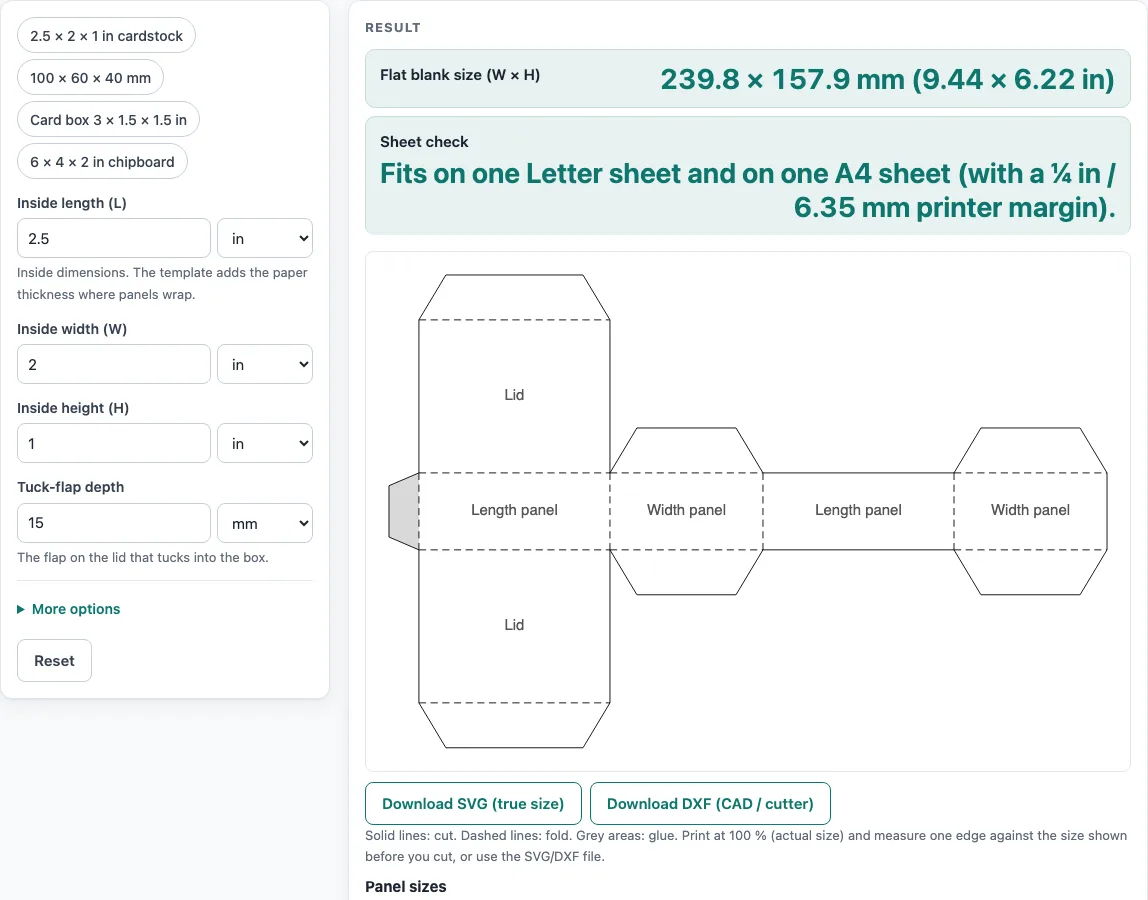
How to use the Rectangle Box Template
- Type the Inside length (L), Inside width (W) and Inside height (H) of the box. Each value has its own unit menu set to in, mm or cm. To see a finished layout first, click an example button, such as 2.5 × 2 × 1 in cardstock.
- Open More options. Choose a Material: Paper (0.2 mm), Cardstock (0.3 mm), Chipboard (0.5 mm), Chipboard (1 mm), E-flute corrugated (1.5 mm), or Custom thickness. If you choose Custom thickness, enter the Material thickness (T) in mm, in or cm.
- Set the Tuck-flap depth, which is the flap on the lid that tucks into the box. If you need a wider glue tab, change the Glue-flap width.
- Read the Flat blank size (W × H) and the Sheet check in the result.
- If a warning appears, read it. The tool warns when the tuck flap is deeper than the wall, when the dust flaps are shortened, and when the blank is too big for one Letter or A4 sheet. Adjust the value it names, then check the result again.
- Choose Download SVG (true size) for printing and design software, or Download DXF (CAD / cutter) for cutting machines. To print, choose Print / save as PDF and set the printer to 100 %, not “fit to page.”
Copy result copies the result lines, and Reset restores the default values. Under the result, How it was calculated shows each step using your own numbers.
How do I make a rectangle box out of paper?
To make a rectangle box from paper, cut out the flat blank along the solid lines, score the dashed folds, fold the panels up, glue the grey areas, and tuck the lid flap in. The blank holds four side panels in a row. The top and bottom are attached to one length panel, and small dust flaps close each end.
Paper has thickness, so each panel that wraps around the box must be a little larger than the inside size. The tool adds one thickness, T, to each wrapping panel. Using the default example of 2.5 × 2 × 1 in (63.5 × 50.8 × 25.4 mm) in 0.3 mm cardstock, the side panels become:
- Two length panels: L′ = 63.5 + 0.3 = 63.8 mm
- Two width panels: W′ = 50.8 + 0.3 = 51.1 mm
- Height panels: H′ = 25.4 + 0.3 = 25.7 mm
The lid depth is W′ plus the tuck flap, which is 51.1 + 15 = 66.1 mm. The blank width is the glue flap plus the four side panels: 10 + 2 × 63.8 + 2 × 51.1 = 239.8 mm. The blank height is the panel height plus the top and bottom: 25.7 + 2 × (51.1 + 15) = 157.9 mm. These are the numbers the tool reports as 239.8 × 157.9 mm (9.44 × 6.22 in).
Score the dashed folds before you bend them, so the board folds in a straight line and the corners stay square.
Can I use the results in commercial work such as quotes and bids?
Yes. Templates and results may be used in commercial work, including boxes and bags you sell and files you send to printers and die makers. No attribution is needed. Because board thickness, grain direction, and your printer or cutter all change the fit, make a sample before a production run and base quotes and bids on the tested size.
Sources
- Packlane, How thick is the material of my boxes and Sourceful, corrugated flutes — E-flute about 1/16 in (1.5 mm), B-flute about 1/8 in (3 mm)
- Panel sizes, flaps and curves are plain geometry (no packaging standard is copied); FEFCO style codes are used only as names
- Paper sizes: A4 210 × 297 mm and A3 297 × 420 mm (ISO 216), US Letter 8.5 × 11 in and Tabloid 11 × 17 in (ANSI/ASME Y14.1)
- 1 in = 25.4 mm exactly (NIST SP 811)
Worked examples
| Input | Result |
|---|---|
| 2.5 × 2 × 1 in, Cardstock (0.3 mm) | Blank 239.8 × 157.9 mm (9.44 × 6.22 in). Fits on one Letter sheet and on one A4 sheet (with a ¼ in / 6.35 mm printer margin). |
| 100 × 60 × 40 mm, Cardstock (0.3 mm) | Blank 331.2 × 190.9 mm (13.04 × 7.52 in). Too big for Letter or A4, but fits A3 / Tabloid. Download the SVG to print it at size. |
| 3 × 1.5 × 1.5 in, Paper (0.2 mm) | Blank 239.4 × 140.3 mm (9.43 × 5.52 in). Fits on one Letter sheet and on one A4 sheet (with a ¼ in / 6.35 mm printer margin). |
| 6 × 4 × 2 in, Chipboard (thin) (0.5 mm) | Blank 522.7 × 286 mm (20.58 × 11.26 in). Does not fit on Letter, A4, A3 or Tabloid. Download the SVG or DXF and print or cut it at size on a large plotter or cutting table. |
Calculated by the tool above with these values.
Frequently asked questions
Is the calculator free, and is anything I type uploaded?
Yes. The tool is free, needs no sign-up, and runs entirely in your browser. Nothing you type is uploaded.
What does the Sheet check line tell me?
It shows whether the flat blank fits on one Letter sheet (8.5 × 11 in, 215.9 × 279.4 mm) or one A4 sheet (210 × 297 mm), with a ¼ in (6.35 mm) printer margin. If it is too big for both, the result tells you it fits a larger sheet, such as A3 or Tabloid, or that you need to download the SVG or DXF file.
Why does the tool warn that the tuck flap is deeper than the box wall?
The tuck flap is deeper than the wall height, so it will not tuck in cleanly. Reduce the Tuck-flap depth until it is shallower than the wall. A separate warning appears when the tuck depth is more than half the end width: the dust flaps are then limited to half the end width less one thickness.
What should I do if my blank is too big to print?
Make the box smaller, or download the SVG and print it at a print shop or on a large-format printer. The 6 × 4 × 2 in chipboard example gives a 522.7 × 286 mm blank, which does not fit Letter, A4, A3 or Tabloid, so print it from the SVG at a print shop or cut it from the DXF file.
Which units can I use?
Each measurement has its own menu for inches, millimeters or centimeters, so you can mix units. The template is drawn in millimeters and also reported in inches.
Can I make a box with a lid other than a straight tuck end?
The tool makes a straight tuck end box. It closes at the top and bottom with a tuck flap on the same side, plus two small dust flaps at each end.
Related tools
- Gift box template: Use it when you want a box for presents, with a lid and base design.
- Gable box template: Use it when you want a box with a peaked, house-shaped top.
- Pillow box template: Use it when you want a soft, pillow-shaped box for small items.
- Paper bag template: Use it when you need a flat pattern for a paper bag instead of a box.
- Box template generator: Use it when you want to compare or create several box styles.
- Pizza box dieline: Use it when you need a dieline for a large pizza-style box.
- Tuck box template: Use it when you want a tuck box design with a different closing style.
- All calculators: Use it to browse every calculator on the site.